TL;DR (Invoice Generator App vs Website)
- Invoice generator apps are best if you bill on the move (delivery-based businesses, field consultants, Meesho/Flipkart sellers packing orders).
- Invoice generator websites are best if you want zero storage use, instant GST invoices, no installation, and cross-device access.
- Most Indian freelancers and small businesses today prefer web-based invoice generators because they work on any phone or laptop without eating storage, and platforms like makeinvoicefree.in let you create a GST or non-GST invoice in under 2 minutes with no signup.
- If you need offline billing at a shop counter, a dedicated app (like Vyapar or TallyPrime) makes more sense.
Quick Answer
An invoice generator app is a downloadable tool installed on your phone or PC, while an invoice generator website runs directly in your browser with no installation. For most Indian freelancers, MSMEs, and small sellers, a website-based invoice maker is faster to start with, doesn’t use phone storage, and works across Android, iOS, and desktop ,while apps suit businesses that need offline access or advanced inventory tracking.
Why This Decision Actually Matters for Your Business ?
Search “invoice generator app” on the Play Store today, and you’ll find dozens of options , some free, some with hidden subscriptions, some bloated with features you’ll never touch.
At the same time, a quick Google search for “free invoice generator app for android India” throws up both apps and websites claiming to be the “best.”
This confusion costs Indian businesses real time. A Meesho seller packing 40 orders a day doesn’t have 20 minutes to compare invoicing tools , they need to know, right now, whether to download something or just open a browser tab.
This guide breaks down exactly that decision, with a practical comparison, real use cases, and a step-by-step method to get your first invoice out in the next five minutes.
What Is an Invoice Generator App?
An invoice generator app is software you install on your Android phone, iPhone, or PC through the Play Store, App Store, or a direct download link.
Once installed, it typically stores your business data locally (or on the app’s own cloud), and you can create, edit, and manage invoices without needing internet access every time.
Examples of categories in this space: Vyapar, TallyPrime (billing module), Zoho Invoice app, Busy Accounting app, and various “Invoice Maker – InvoiceBase” style utility apps on the Play Store.
Key Characteristics of Invoice Apps :
- Requires download and installation (uses phone/PC storage)
- Often works offline once set up
- May need periodic updates
- Frequently bundled with inventory, expense tracking, or accounting features
- Some free invoice maker apps for Android in India carry watermarks or ads unless you upgrade
What Is an Invoice Generator Website?
An invoice generator website is a browser-based tool you access directly through a URL , no installation, no app store, no storage used on your device.
You open the site, fill in your business and client details, add line items, apply GST if needed, and download the invoice as a PDF.
A tool like the free invoice maker at makeinvoicefree.in works exactly this way , GST and non-GST invoices, generated in the browser, downloaded instantly, with no signup required.
Key Characteristics of Invoice Websites :
- Works instantly on any device with a browser
- Zero installation, zero storage used
- Usually free for standard use, with no forced login
- Automatically updated by the provider, you always get the latest version
- Ideal for occasional or one-off invoicing needs
Invoice Generator App vs Website: Full Comparison Table
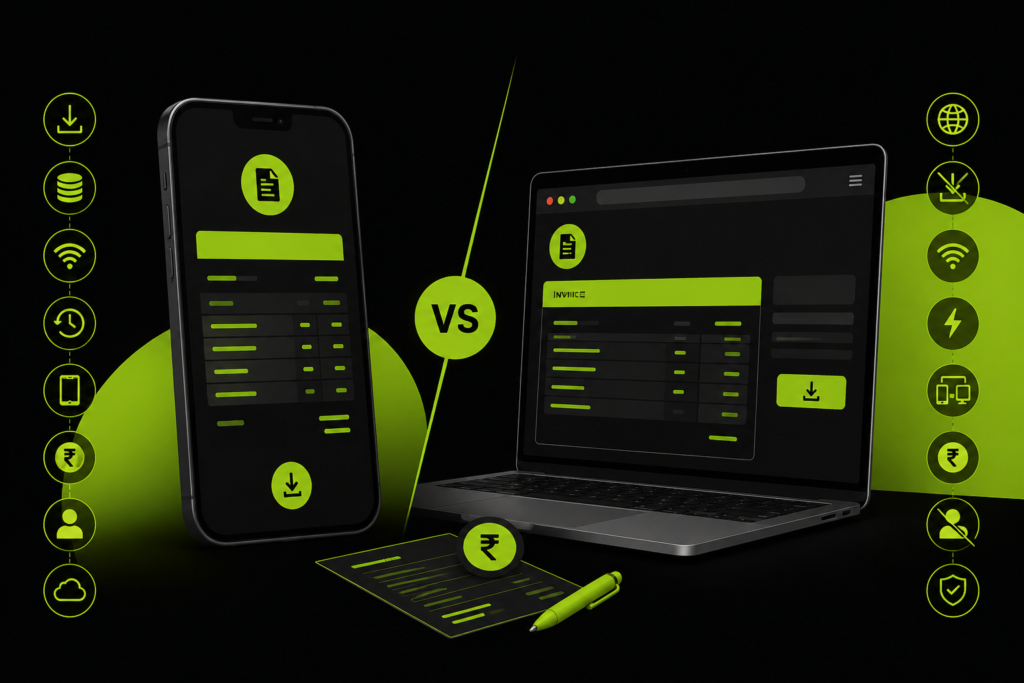
| Factor | Invoice Generator App | Invoice Generator Website |
|---|---|---|
| Installation | Required (Play Store/App Store/PC download) | Not required — opens in browser |
| Storage used | Uses phone/PC storage | Zero storage used |
| Offline access | Often available | Usually requires internet |
| Setup time | 5–15 minutes (download + install + setup) | Under 1 minute |
| Device flexibility | Tied to the device it’s installed on | Works on any phone, tablet, or laptop |
| GST invoice support | Available in most business apps | Available on tools like makeinvoicefree.in |
| Cost | Often freemium — free tier + paid upgrade | Mostly free for basic invoicing |
| Login/signup | Usually required to save data | Often not required |
| Data storage | Stored locally or on app’s cloud | Processed in-browser; not stored by the tool |
| Best for | Shop owners, inventory-heavy businesses | Freelancers, consultants, one-off invoices |
| Updates | Manual app updates needed | Always up to date automatically |
| File sharing | Share via app or export | Instant PDF download, share via WhatsApp/email |
Summary: The core difference between an invoice generator app and a website is installation — apps need to be downloaded and use device storage, while websites work instantly in any browser with no installation and no storage use.
Invoice Generator App: Pros and Cons
Pros
- Works offline once installed — useful for shops with patchy internet
- Often includes inventory and stock tracking alongside billing
- Some apps sync data across your own devices via cloud backup
- Good for high-volume, repeat billing (same clients, same items)
Cons
- Eats phone storage, especially on budget Android devices common across India
- Free invoice maker apps for Android in India often push in-app ads or premium upgrades
- Updates can break templates or require re-learning the interface
- Switching phones means reinstalling and sometimes losing saved data
Invoice Generator Website: Pros and Cons
Pros
- No installation — works the moment you open the page
- Zero impact on phone storage (important for entry-level Android users)
- Accessible from any device: office laptop, personal phone, cyber café PC
- Usually free with no forced signup, ideal for occasional invoicing
- Automatically updated with current GST slabs and formats
Cons
- Needs an active internet connection to generate a new invoice
- Data isn’t saved on the platform unless you download the PDF yourself
- Not ideal if you need deep inventory or multi-user accounting features
Best Free Invoice Generator App for Android in India: What to Look For
If you’ve decided an app suits your workflow better, here’s what actually matters when picking a free invoice generator app for Android in India — beyond just star ratings:
- GST invoice support — GSTIN field, CGST/SGST/IGST breakdown, and HSN/SAC code fields
- No mandatory subscription for basic invoicing
- PDF export without watermark on the free tier
- Low storage footprint — check the app size before installing on entry-level phones
- Data backup option so you don’t lose invoice history if you switch devices
- UPI/payment link support — useful since most Indian clients pay via UPI, Google Pay, or PhonePe Business
Pro Tip: Before installing any invoice app, check its Play Store permissions. A billing app asking for contacts, camera, or location access beyond what’s needed for logo upload is a red flag.
What About “Invoice Maker App for PC” or “Free Invoice App Download for PC”?
Many users search for an invoice maker app free download for PC, expecting a desktop application similar to what they use on mobile.
In practice, most modern billing tools, including free ones, have moved away from PC-specific downloads. Here’s why:
- Desktop apps need regular updates for security and GST rate changes
- They’re tied to one machine, unlike a browser tool you can use anywhere
- Businesses today mix devices, billing from a phone at a client site, then finalising on a laptop
Instead of hunting for a “free invoice app download,” most Indian freelancers and consultants now use a browser-based invoice and estimate maker that works identically on PC and mobile, no separate download needed. This also solves the common “Invoice Maker and Estimate Maker” search intent, since a good web tool covers both invoices and estimates without needing two separate apps.
Which One Should You Actually Choose? (Decision Framework)
Choose an App If:
- You run a retail shop with daily walk-in billing and need offline support
- You manage inventory alongside invoicing (stock levels, reorder alerts)
- You bill the same 20–30 clients repeatedly and want saved templates
- Your business has multiple staff who need role-based access to billing
Choose a Website If:
- You’re a freelancer or consultant billing a handful of clients monthly
- You’re a startup or MSME just getting GST-registered and need quick, compliant invoices
- You’re an Amazon, Flipkart, or Meesho seller who needs fast, one-off invoices per order
- You want to avoid app clutter on a phone with limited storage
- You need to bill from different devices — home, office, or on the move
Step-by-Step: How to Create a GST Invoice Online for Free (Website Method)
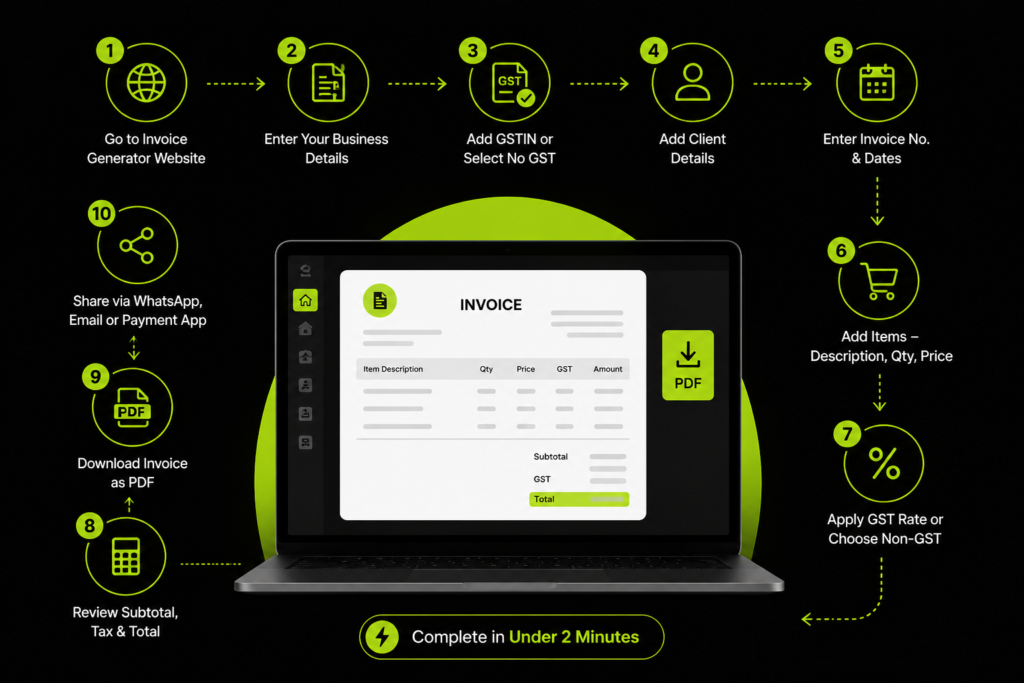
- Go to a free invoice generator website such as makeinvoicefree.in
- Enter your business name, address, and GST Registration status
- If GST-registered, add your GSTIN; if not, select “No GST”
- Add your client’s billing details
- Enter invoice number, invoice date, and due date
- Add line items — description, quantity, price
- Apply the correct GST rate (5%, 12%, 18%, or 28%) if applicable, or leave it as a non-GST invoice
- Review the subtotal, tax, and total amount
- Download the invoice as a PDF
- Share it via WhatsApp, email, or your preferred payment app
This entire process takes under two minutes once your business details are saved for reuse.
Common Mistakes Businesses Make When Choosing an Invoicing Tool
- Downloading multiple apps to “compare,” which wastes phone storage without solving the actual need
- Ignoring GST compliance fields — missing GSTIN, HSN/SAC codes, or incorrect tax breakup can cause Input Tax Credit (ITC) issues for your client
- Using generic templates that don’t separate CGST, SGST, and IGST correctly for intra-state vs inter-state sales
- Signing up for paid apps too early, before validating whether a free website tool already covers their invoicing needs
- Not keeping invoice numbering sequential — a common issue when switching between an app and a website mid-year
Common Myths About Invoice Generator Apps and Websites
Myth 1: “Websites can’t create GST-compliant invoices.” False. Any tool, app or website, can build a fully GST-compliant invoice as long as it includes GSTIN, HSN/SAC codes, and correct CGST/SGST/IGST breakup. Compliance depends on the fields included, not whether it’s installed or browser-based.
Myth 2: “Apps are always more secure than websites.” Not necessarily. Security depends on whether data is stored, where, and how it’s encrypted — not on installation. A no-login website that never uploads your data can be safer than an app account sitting on a third-party cloud.
Myth 3: “Free invoice tools are only for small invoices.” Most free invoice generators, app or website, don’t cap invoice value. The “free” tier usually limits invoice count per month or removes premium templates, not the billing amount itself.
Myth 4: “You need an app to add your business logo and branding.” Most browser-based invoice makers support logo upload too. Branding isn’t exclusive to installed apps.
Myth 5: “Websites don’t work well on mobile.” Modern invoice websites are built mobile-first, since the majority of Indian users search and transact primarily on phones. A well-built tool feels just as smooth as an app on a browser.
Switching Between an App and a Website: What to Know
If you’ve been using an app and want to switch to a website tool (or vice versa), keep these points in mind:
- Invoice numbering continuity — note your last invoice number before switching, so your new tool continues the sequence correctly for GST audit purposes
- Export existing records first — download or export your invoice history from the app before uninstalling it, since most apps don’t let you retrieve data after deletion
- Update payment details on new invoices — if you’ve changed your UPI ID or bank account, update it before generating your next batch of invoices
- Inform regular clients if your invoice format changes noticeably, especially for corporate clients who file your invoices against Input Tax Credit (ITC) claims
Switching tools mid-year is common and not a compliance issue by itself, what matters is that invoice numbering stays sequential and every invoice still carries the mandatory GST fields.
GST Compliance: What Both Apps and Websites Must Get Right
Whether you use an app or a website, a valid GST invoice in India must include:
- Supplier’s name, address, and GSTIN
- Invoice number and date (sequential, unique per financial year)
- Buyer’s details (name, address, and GSTIN if registered)
- HSN or SAC code for goods or services
- Description, quantity, and value of goods/services
- Applicable CGST, SGST, or IGST rate and amount
- Total invoice value
For businesses under the e-invoicing mandate (based on turnover thresholds set by the GST Council), invoices also need to be registered on the Invoice Registration Portal (IRP) to generate an IRN — a step most basic free apps and websites don’t handle, so check this before relying solely on a free tool if your turnover falls in the e-invoicing bracket. You can verify current thresholds directly on the GST Portal.
Cost Breakdown: What Do Apps and Websites Actually Cost in India?
“Free” rarely means the same thing across tools. Here’s how the cost structure usually plays out:
| Cost Factor | Typical Invoice App | Typical Invoice Website |
|---|---|---|
| Basic invoicing | Free, often with limits (e.g., 5–10 invoices/month) | Usually unlimited on free tools |
| Watermark removal | Paid upgrade in most free apps | Not applicable — no watermark on tools like makeinvoicefree.in |
| Inventory/stock module | Paid add-on in most apps | Not offered (websites focus on billing only) |
| Multi-device sync | Paid tier in many apps | Automatic — same URL works everywhere |
| Annual subscription | ₹1,500–₹6,000+ depending on the app | ₹0 for basic GST/non-GST invoicing |
If your business genuinely needs stock tracking, staff logins, or ledger management, a paid app subscription earns its cost back quickly. But if you only need clean, compliant invoices, paying for an app is often solving a problem you don’t have.
Security and Data Privacy: App vs Website
This is one of the most overlooked factors in the app-vs-website decision, and it deserves more attention than star ratings.
With apps:
- Your business and client data usually sits on the app’s own servers once you create an account
- Data persists across sessions, which is useful for records but means you’re trusting a third party to secure it long-term
- Some apps request broader device permissions (contacts, storage, camera) than strictly necessary for invoicing
With websites (especially no-login tools):
- Many browser-based invoice generators process your data only within that session — nothing is uploaded or stored on the provider’s servers
- There’s no account to be breached because there’s no account to begin with
- You control the only copy of the invoice: the PDF you download
Before trusting either option with sensitive client information, GSTIN, PAN, bank details, contact numbers, check the provider’s Privacy Policy and confirm whether data is stored, and if so, where and for how long.
How AI and Automation Are Changing Invoicing in India (2025–2026)
The invoicing space itself is shifting quickly, and it’s worth knowing where things are headed before you commit to a tool:
- Auto-fill from previous invoices — most modern tools now remember your last-used business details and client list, cutting invoice creation time further
- UPI and payment-link integration — invoices increasingly carry a scan-to-pay QR code, tying directly into UPI, Paytm Business, PhonePe Business, and Google Pay for Business
- E-invoicing expansion — the GST Council has progressively lowered the turnover threshold for mandatory e-invoicing over recent years, pulling more MSMEs into IRN-based invoicing; always check the current threshold on the GST Portal rather than relying on outdated blog posts
- AI-assisted GST error checks — some accounting platforms (Zoho Books, Razorpay) now flag likely GST rate mismatches or missing HSN codes before you finalise an invoice
- Digital India push toward paperless billing — as part of broader Digital India and Startup India initiatives, more government and enterprise clients now expect PDF invoices with digital verification rather than handwritten or scanned bills
None of this changes the core app-vs-website decision, but it does mean the gap between “basic” and “smart” invoicing tools is narrowing, even free tools are getting sharper.
Top Features to Compare Before You Commit to Either
Before finalising your choice, run through this checklist regardless of whether you’re leaning app or website:
- Does it support both GST and non-GST invoices? — Your registration status may change as your turnover grows
- Can you add your business logo? — Matters for client trust, especially with new customers
- Does it calculate CGST/SGST/IGST automatically based on intra-state vs inter-state billing?
- Is the PDF export clean and professional, without forced watermarks on the free tier?
- Can you reuse client details for repeat invoices without retyping everything?
- Does it support multiple currencies (INR, USD, EUR) if you bill international clients or export goods?
- Is there a mobile-friendly interface, even if it’s a website, so it works well from a phone browser too?
A tool that checks most of these boxes, app or website, will comfortably handle invoicing for the majority of Indian freelancers, MSMEs, and small sellers.
Invoice App vs Website: A Real Indian Business Scenario
Scenario 1 — Freelance Graphic Designer (Bengaluru): Bills 6–8 clients a month, mostly project-based. A website tool works better, no app needed for occasional invoicing, and GST isn’t even applicable below the registration threshold in many cases.
Scenario 2 — Kirana Store Owner (Indore): Bills 100+ customers daily, often with patchy internet. An offline-capable app like Vyapar or TallyPrime fits better here, especially with inventory tracking built in.
Scenario 3 — Meesho Seller (Surat): Needs to generate an invoice per order, fast, from a phone while packing. A lightweight website tool that doesn’t need installation keeps the phone free of clutter and works the same whether packing from home or a warehouse.
Scenario 4 — IT Consulting Agency (Pune): Bills 3–4 large corporate clients monthly, often needs to send invoices in USD for an overseas client alongside INR invoices for domestic ones. A website tool with multi-currency support (INR, USD, EUR) handles both without needing separate software, and the team can generate invoices from any team member’s laptop without installing anything company-wide.
Scenario 5 — CA Firm Managing Multiple Small Clients (Delhi): Handles invoicing on behalf of 15+ small business clients who don’t have their own billing setup. A no-login website tool works well here too , the CA can quickly generate a compliant invoice for a client during a call, without needing that client to have any account or app installed on their end.
Frequently Asked Questions :
Is an invoice generator app better than a website? Neither is universally “better.” Apps suit businesses needing offline billing and inventory tracking, while websites suit freelancers and small sellers who want instant, no-installation invoicing.
What is the best free invoice generator app for Android in India? Look for one with GST invoice support, no forced subscription, watermark-free PDF export, and low storage size. Popular options in this space include Vyapar and Zoho Invoice’s mobile app, though free-tier limits vary by app.
Do I need to download an app to create a GST invoice? No. Websites like makeinvoicefree.in let you create GST-compliant invoices directly in your browser without downloading anything.
Is there a free invoice maker app for PC without watermark? Most PC-specific downloads either require a paid upgrade to remove watermarks or limit free invoices per month. A browser-based invoice generator avoids this issue entirely since it isn’t tied to a single installed app.
Which is safer — an app or a website for business invoicing? Both can be safe if built by a reputable provider. Apps store data on your device or their cloud, while browser tools that don’t require signup typically don’t store your business data on their servers at all. Always check the provider’s privacy policy either way.
Can I use an invoice website instead of accounting software like Tally? For simple billing needs — freelancers, consultants, small sellers — yes. For full bookkeeping, ledgers, and multi-year financial records, dedicated accounting software like TallyPrime or Zoho Books is still more suitable.
Do free invoice generator apps support GST and non-GST invoices both? Most modern invoice apps and websites support both formats — you can toggle GST fields on or off depending on your registration status.
Is my data safe when using a free invoice generator website? On tools that don’t require signup or login, your invoice data is typically processed only in your browser session and isn’t stored on the provider’s servers, which is safer than apps that upload data to a cloud you don’t control.
What’s the difference between an invoice maker and an estimate maker? An invoice is a bill requesting payment for completed work or delivered goods, while an estimate (or quotation) is a proposed cost shared before work begins. Many free tools now combine both — an “Invoice Maker and Estimate Maker” — so you don’t need separate apps.
Can I create invoices without an internet connection? Only apps with offline mode support this. Website-based invoice generators need an active internet connection since they run in the browser.
Will an invoice app or website slow down my phone? A website has no impact on phone performance since nothing is installed. A heavy invoice app with inventory and reporting modules can use noticeable storage and background resources, especially on budget Android devices.
Can I use the same invoice generator for both GST and export invoices? Yes, as long as the tool supports multi-currency billing (INR, USD, EUR) alongside GST fields, useful for exporters who bill both domestic and international clients from one platform.
Key Takeaways
- Apps = better for offline billing, inventory-heavy shops, high daily invoice volume
- Websites = better for freelancers, consultants, and sellers who want zero storage use and instant access from any device
- Always verify GST compliance fields — GSTIN, HSN/SAC code, and correct CGST/SGST/IGST breakup — regardless of which tool you pick
- If your turnover falls under the e-invoicing mandate, confirm your tool supports IRN generation via the GST Portal
- For most Indian freelancers, MSMEs, and online sellers, a free web-based invoice generator like makeinvoicefree.in covers 90% of invoicing needs without the storage or subscription baggage of an app
There’s no single “best” answer to invoice generator app vs website — it depends on how you bill, how often, and whether you need offline access or inventory tracking alongside it.
But if you’re a freelancer, consultant, MSME, or online seller who just wants a professional GST or non-GST invoice out the door in under two minutes, without installing anything or signing up, a website-based tool covers that need instantly.
Try the free invoice generator at makeinvoicefree.in — no signup, no download, GST and non-GST support built in.